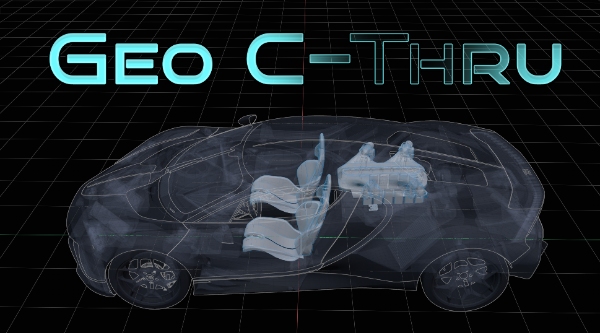
NEW 2.1 Update! This update adds MatCap shading mode, a toggle to force objects solid so everything is visible when nothing is selected, dramatically increased preset limit to 50, make all subpanels collapsible for a cleaner interface, and tons of behind the scenes fixes and improvements! Geo-C-Thru Geometry See Through?! YES YOU CAN! The core purpose of this tool is to give you direct, real-time control over how objects look in your viewport based on what you have selected. As you work, objects can automatically turn transparent, solid, or wireframe on the fly. Here's a functional breakdown of what it does: Dynamic Display Rules: The central feature. You can set it so that when you select an object, all non-selected objects instantly become semi-transparent or switch to wireframe. Conversely, you can make your active selection transparent to see what's behind it. These controls are independent, so you can configure the exact behavior you need to reduce visual clutter in complex scenes. Full Preset System: You can save and load any combination of these settings as a preset. I've included nine to start with, like a "Blueprint" preset that configures the viewport for clean technical screenshots, and advanced "X-Ray" presets that create a clear visual hierarchy between selected and non-selected objects. Absolute Overrides for Collections: You can assign permanent display rules to a specific Collection. For example, you can set a collection containing all the bolts on a model to always display as wireframe, regardless of your current selection. This gives you another layer of organization for complex assemblies. Direct Viewport Shading Control: Version 2.0 expands beyond object properties and gives you a panel to control the entire viewport environment. You can now override and manage lighting (Studio/Flat), cavity, shadows, backgrounds, and even lock the view to Orthographic without it snapping back to perspective when you rotate. This tool is for anyone who needs to work on specific parts of a dense model without constantly hiding and unhiding geometry. It's designed to make your immediate work area clear while keeping the rest of the scene visible for context. This is a completely free update for everyone who already purchased the addon. I built this to be a practical tool for my own daily work, and I hope you find it just as useful. Select The Preset System: Your View Modes, On Demand The true power of Geo-C-Thru lies in its robust Preset System, combined with the unintrusive header menu to access your presets. Save your entire viewport configuration and object display modes and load them with a single click. This allows you to create task-specific "view modes" that you can switch between instantly. Stop tweaking settings one by one and change your entire viewport to match your task at the speed of thought. All of this power is available right in your 3d viewport header. Total Visibility Control Master your object display with a powerful and intuitive set of tools. All controls are located in one clean panel in the N-Panel, and your favorite presets are always available in the Viewport Header for instant, clutter-free viewport mode switching. Transparency & Wireframe Independently control the transparency of selected and non-selected objects. Display objects as clean wireframes, with a dedicated opacity slider for the overlay. Combine them to make non-selected objects display as faint wireframes while your active object remains solid or any other combination you can think of! Advanced Color Control Assign custom override colors for selected and non-selected objects, or entire collections. Switch your Color Source on the fly to Material, Texture, or Random to create custom view modes or check texture assignments. A Creative Tool for Showcasing Your Work Geo-C-Thru isn't just for workflow enhancement—you can use it for creating pretty dang cool showcase images directly from your viewport. Use the deep control over outlines, colors, and shading to generate unique visual styles for your models without having to juggle render settings or complex shaders. The "Blueprint" preset gives you a clean, technical schematic look. "That’s so Sketchy" renders your view like it’s a pencil drawing on white paper, combine it with grease pencil or annotation lines for a truly natural hand-drawn look. Create your own presets to develop a signature look for your portfolio or social media posts! Blender 4.5 users get a special 9th preset for that killer look! Full Feature List Object Display: Independent Transparency (Selected/Non-Selected) Independent Wireframe Toggles (Selected/Non-Selected) Wireframe Opacity Slider Custom Color Overrides (Selected/Non-Selected) Advanced Color Source (Object, Material, Texture, Random) "In Front" Toggle for Selected "Orthographic Wireframe" mode for technical views Viewport Shading: Full control over X-Ray, Cavity, and Shadows Lighting Mode Switch (Studio/Flat) Toggle for Object Outlines & Selected Object Outline Custom Background Color Override Scene Management: Collection Overrides (beta): Set persistent display rules for entire collections! Full Preset System: Save and load every setting into a custom preset. Access presets from the N-Panel or the Viewport Header Menu. 9 Included Presets to get you started. What You Get: The Geo-C-Thru Addon Clear Documentation Free Updates for Life Geo-C-Thru is the visibility tool that should be built into Blender. Take control of your viewport and elevate your workflow today! Geo-C-Thru 1.8.31 and earlier: These features from previous versions have been carried forward and enhanced in version 2.0 Quick Access! Select What Geo-C-Thru can do Select Preset Customization Dynamic Transparency Toggles Wireframe Display Options Custom Color Settings 'In Front' Display Orthographic Wireframe User-Friendly Interface Feature Requests Feature requests are welcome and should be sent to the contact email with "Geo-C-Thru Feature Request" in the subject line.
BlendaHaven is a premium marketplace for Blender assets, add-ons, 3D models, and training courses. Our creators earn 85% revenue share - one of the highest in the industry. All products are reviewed for quality before being published.
Browse more Addons products | Explore Training Courses | Become a Creator